Get Traffic

close
PopAds.net - The Best Popunder Adnetwork

Showing posts with label Techonology. Show all posts

Wednesday, 13 July 2011

Kamera Tembus Pandang

Seorang wanita cantik telanjang keluar dari kolam berenang. Ia melenggang santai, tanpa terlihat risih berjalan mengitari kolam menuju kursi yang berjejer di tepian. Tidak lama berselang, gadis remaja berwajah lugu dengan postur bugil sedikit berlari melintas menuju kamar ganti usai berenang. Wanita-wanita yang tampak ”bugil” tersebut bukan orang gila. Mereka juga bukan kaum ekshibisionis yang gemar memperlihatkan tubuh telanjang.

Sesungguhnya mereka mengenakan pakaian renang. Namun, tubuh mereka jadi tampak telanjang hanya korban dari kecanggihan teknologi kamera tembus pandang yang terpasang di handphone (HP). Baju renang yang mereka pakai Justru menjadi bahan sempurna yang dapat ditembus sinar infra merah. Handphone dengan kamera Xray built-in itu memungkinkan para perempuan terlihat sia-sia menutupi tubuhnya dengan pakaian renang atau senam yang Umumnya terbuat dari bahan sintetis.

Kamera tembus pandang ! Itu bekerja pada tinta, bahan-bahan sintetis seperti baju renang, baju senam, original silk (sutera asli). Tapi tidak berfungsi pada bahan lain seperti nilon, katun dan jins. Tidak ada sistem on/off untuk Xray, jadi HP tembus pandang akan selalu keadaan on, tetapi hanya berefek pada bahan sintetis. Target banyak terdapat di kolam renang, gym/fitness, pesta, dancer. Tidak sulit mendapatkan perangkat ”nakal” tersebut. Bahkan dalam satu Iklan yang terpampang jelas di sebuah situs Internet. Dilengkapi dengan Tarif modifikasi yang dibutuhkan untuk setiap HP.
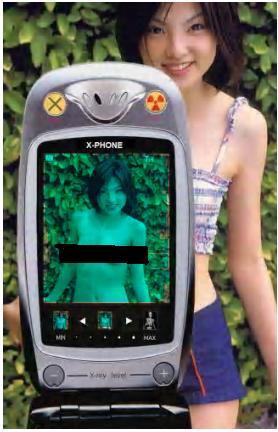


hasil photo


Biayanya, minimal satu Juta rupiah untuk jenis Nokia 3660 nokia-3660.jpgDan Sony Ericsson K500 sony-erikson-k500.jpg. Untuk spesifikasi HP yang lebih canggih seperti Nokia 9500 nokia-9500.jpgatau XDA O2, Diperlukan biaya sebesar dua juta rupiah. HP akan dirombak total, Karenanya lupakan garansi jika kelak HP bermasalah. Peminatnya tidak sedikit. Menurut Edu, penjual peranti tersebut, peminat HP tembus pandang berasal dari berbagai kalangan. Harganya kan tidak terlalu mahal, tetapi yang beli memang punya niat jahil betul. Tiap hari ada saja yang beli, tambahnya sambil tertawa.

Menurutnya, kebanyakan peminat HP jenis itu memang laki-laki. wew target mereka jelas, meneropong para perempuan yang di kolam renang umum dan tempat senam atau fitness.
Karena di tempat itu, para kaum hawa memang menggunakan bahan pakaian Yang memungkinkan untuk ditembus hingga ke permukaan kulit. Teknologi sih memang gila kalau dikuasai orang-orang yang tidak berakhlak, komentar pengamat tekno
logi informasi, Ono W Purbo Blak-blakan, Jumat (10/06). Padahal, tadinya teknologi inframerah yang digunakan untuk menembus lapisan penghalang kulit hanya digunakan dalam Teknologi militer. Teknologi itu biasanya dipakai dalam pengintaian malam Hari. Secara Sederhana, sinar infra red akan menangkap panas dari tubuh. Jadi, tubuh Akan terlihat jelas meski dalam keadaan gelap, paparnya. Namun yang Berkembang, teknologi semacam ini digunakan untuk hal-hal yang

Menjadikan kaum perempuan sebagai korban.

Adalah Kaya Spesial Optic, Inc, sebuah perusahaan asal Jepang yang mengenalkan produk yang disebut Infrared See Through Filter. Perusahaan yang mengkhususkan diri pada alat optik selama 30 tahun itu memproduksi sebuah alat yang dapat menembus pandangan dibalik permukaan Objek. Pada dasarnya, apa yang dilihat manusia adalah pantulan cahaya yang merepresentasikan bagian terbatas dari spektrum elektromagnetik.

Ada syarat yang harus dipenuhi sebuah objek agar dapat terlihat mata manusia normal, yaitu panjang gelombang. Radiasi sinar inframerah tidak terlihat mata manusia normal karena panjang gelombangnya tidak memenuhi Syarat. Plastik merupakan bahan yang dapat membelokkan radiasi Inframerah masuk ke dalam klasifikasi gelombang terlihat.

Sementara baju renang dan senam terbuat dari bahan sintesis pabrik yang pada dasarnya adalah plastik. Akibatnya, jika sinar inframerah dikenakan pada permukaan sintetis, maka IA akan membelokkan gelombang sesuai dengan prasyarat mata normal. Selanjutnya, pantulan permukaan kulit dibalik baju berbahan sintetis akan terlihat jelas. Kebebasan untuk berenang di tempat umum atau berlatih kebugaran di pusat fitness menjadi terampas. HP yang dilengkapi dengan perangkat tersebut dapat digunakan kapan saja di tempat umum tanpa terlalu mencurigakan. Kegiatan merekam dan kemudian disimpan dalam memory card tidaklah hal yang rumit. Penyebarannya lebih mudah lagi. Transfer data yang didukung oleh kemudahan teknologi, dinikmati oleh sebagian besar pemilik HP.

Penikmatnya juga tidak sedikit. Gue sih seneng-seneng aja kalau punya File seperti itu. Apalagi gratisan, ujar Agus, seorang pekerja swasta. Kepemilikan piranti tersebut tentu legal. Tapi yang menjadi masalah Adalah ketika teknologi tersebut berubah menjadi teror yang mengganggu

Aktivitas normal. Sementara mekanisme hukum terlalu jauh di belakang kemajuan teknologi! Yang membuka ruang bagi intimidasi. Kalau modus kamera tersembunyi di toilet umum atau kamar ganti bisa sedikit diakali. Sikap hati-hati Dan waspada akan semua titik-titik Mencurigakan sebelum menggunakan ruang publik tersebut. Namun, Keberadaan HP tembus pandang tidak seperti kamera tersembunyi HP ini tidak terlihat mencolok karena modifikasinya tidak akan menghasilkan perbedaan yang kentara secara fisik. Artinya, kolam renang umum bukan Lagi tempat yang menyenangkan untuk berolahraga atau berekreasi melepas kepenatan.

Teknologi memang ibarat pisau bermata dua. Kegunaannya dapat menguntungkan sekaligus mengganggu orang lain Tapi, saat pemanfaatannya merugikan sebagian orang, akan ada reaksi yang muncul. Bagaimanapun, yang menjadi mekanisme kontrol adalah masyarakat, ujar Onno. Dengan luasnya informasi yang sampai ke masyarakat, bukannya tidak mungkin akan timbul reaksi.

Perusahaan raksasa asal Jepang, Sony, akhirnya menghentikan produksi handycam x-ray dan menarik kembali produk yang sudah dilepas di pasaran. Kebutuhan akan nama baik sebuah perusahaan besar membuat Sony mengambil langkah yang merugi jika dilihat dari sisi ekonomi sebuah produksi.

Be careful girls..

Watch Out!!! Di Jakarta udah nggak ada kehidupan pribadi lagi. Saat anda berada di luar rumah, perhatikan hal-hal berikut:

1. Jangan sembarangan buang air (besar/kecil) di kamar mandi yang tidak jelas (pom bensin, wc umum mal/plaza, wc hotel dll).

2. Jangan melakukan aktivitas seksual (ciuman, raba-meraba dll) di dalam kendaraan.

3. Hati-hati bila membicarakan orang di dalam kendaraan umum atau menceritakan suatu rahasia (misalnya kalau anda membawa uang dalam jumlah besar ke teman anda).

4. Usahakan untuk tidak memakai pakaian/celana/ rok dari bahan sintetis.

Penjelasan untuk point:

1. Hidden-camera (mini-camera) saat ini dijual bebas di Glodok dan harganya murah sekali per paket. Besarnya hanya sebesar uang logam Rp50,- lama. Dan ini dapat dipasang di mana saja & dapat dilihat dengan jelas hasilnya;(Harga Rp125.000,-an)

2. Kamera handphone dan kamera digital, di Glodok sudah bisa di-upgrade untuk dapat melihat tembus pandang seperti lensa kaca mata James Bond; (Harga Rp1.000.000, -an)

3. Ada alat penyadap suara berbentuk ear-phone dijual juga di Glodok untuk menyadap suara secara terbuka sejauh 20 meter; (Rp175.000,- an)

4. Lensa yang di-upgrade untuk kamera handphone atau digi-cam dapat menembus kain berbahan sintetis sehingga dapat melihat seseorang terlihat telanjang. (idem sama nomor 2)

Jadi, berhati-hatilah...WASPADALAH....WASPADALAH.…

Informasi ini semoga berguna ………….


TAG: Your tag here,

Monday, 11 July 2011

Nokia X7-00 review


Dressed to kill and with a fresh coat of paint on the interface, the Nokia X7 is keen to show there's still fight left in Symbian. The screen is a definite high point and the stainless steel body is fashioned like a stealth jet fighter. Symbian Anna adds in features that have been lacking in the OS, closing the gap on the competition.

Nokia X7 official photos
The Nokia X7 combines stainless steel and Gorilla glass into one seriously attractive package. It boasts stereo speakers (just two, rather than four as you might think looking at it) to justify its Xseries spot and an 8MP camera with 720p video recording.
The screen impressed us quite a bit as you'll see in our hardware chapter but that's not all we liked about the hardware. The software changes are not as far-reaching as we would have liked, but there are some key developments that that give Symbian a usability boost.
Here's the short version of what the Nokia X7 is about and what didn’t work out very well.

Key features

  • Quad-band GSM/GPRS/EDGE support
  • Penta-band 3G with 10.2 Mbps HSDPA and 2 Mbps HSUPA support
  • Stainless steel body
  • 4" 16M-color AMOLED capacitive touchscreen of 640 x 360 pixel resolution; Impressive brightness and Gorilla glass protection
  • 8 megapixel fixed-focus camera with dual-LED flash and 720p video @ 25fps recording; geotagging, face detection, smart zoom in video
  • Symbian Anna OS
  • 680 MHz ARM 11 CPU and 256 MB RAM
  • Wi-Fi 802.11 b/g/n
  • GPS receiver with A-GPS support and free lifetime voice-guided navigation
  • Digital compass
  • microSD card slot (8GB card pre-installed)
  • DivX and XviD video support
  • Built-in accelerometer and proximity sensor
  • Standard 3.5 mm audio jack
  • Stereo FM Radio with RDS
  • microUSB port
  • Flash and Java support for the web browser
  • Stereo Bluetooth 3.0
  • Excellent audio quality
  • Smart dialing and voice commands
  • Social networking integration

Main disadvantages

  • Symbian Anna is still catching up with Android and iOS
  • Uncomfortable volume rocker, SIM tray and microSD card slot
  • Camera lacks auto focus, oversharpens images
  • Relatively limited 3rd party software availability
  • No office document editing (without a paid upgrade)
  • Battery life is not on par with the best in business
Despite our complaints, this is the best that Symbian has ever looked and Nokia has picked excellent devices to carry it. While the other one, the Nokia E6, is a business phone through and through, the X7 focuses on the fun stuff. From taking photos and videos, through deeper social networking integration, to watching HD videos and browsing the web on the large 4" screen.
The Nokia X7 is something you'll want to show off to your friends. The Nokia designers have done a good job of breaking the touchscreen mould that makes so many phones look uniformly similar.
Nokia X7 00Nokia X7 00Nokia X7 00


TAG: Your tag here,

LG Optimus Pad

An 8.9" screen hits the sweet spot for tablets and LG's Optimus Pad shows good thinking. The first tablet of the company will want to make a difference among more or less uniform rivals. Tablets coming to the market look almost the same - screens, hardware, OS. There is very little room for experiment, but LG are keen to disagree.
3D is more of a fun show-off feature to have on the side - but LG has taken that very, very seriously. We already met with and were impressed by the Optimus 3D smartphone. Its tablet sibling didn't get an actual 3D screen, but it can take 3D stills and videos. Anaglyph 3D viewing is enabled with a standard pair of polarized glasses.

LG Optimus Pad official photos
The Optimus Pad is based on the powerful NVIDIA Tegra 2 chipeset - the only one currently compatible with the Android 3 Honeycomb (though this is supposed to change with the upcoming 3.2 update). Its 8.9" TFT touchscreen of 1280 x 768 pixel resolution and 32GB of internal storage don’t sound too bad either. The imaging skills are the highpoint on the spec sheet.

LG Optimus Pad at a glance:

  • General: GSM 850/900/1800/1900 MHz, UMTS 900/2100 MHz, HSDPA 10.2 Mbps, HSUPA 2 Mbps
  • Form factor: Tablet
  • Dimensions: 243.8 x 150.0 x 12.7 mm, 621 g
  • Display: 8.9" 16M-color WXGA (1280 x 768 pixels) TFT capacitive touchscreen
  • CPU: Dual-core 1GHz ARM Cortex-A9 proccessor, ULP GeForce GPU, Tegra 2 chipset
  • RAM: 1GB
  • OS: Android 3.0.1 Honeycomb
  • Memory: 32 GB storage
  • Camera: dual 5 MP, autofocus, LED flash with 1080p@24fps video recording; Stereoscopic 720p@30fps videos; geotagging, face detection; 2 megapixel front facing camera, video-calls
  • Connectivity: Wi-Fi b/g/n, Wi-Fi hotspot, Bluetooth 2.1 with A2PD, standard microUSB port,GPS receiver with A-GPS, 3.5mm audio jack, HDMI TV-out
  • Misc: built-in accelerometer, multi-touch input, proximity sensor, gyroscope sensor
So, on top of the ordinary Full HD video capture, you get 720p 3D video. At one point users of the Optimus Pad will want to consider the Optimus 3D smartphone. If they haven't already got themselves an LG 3D TV set.
LG Optimus Pad V900LG Optimus Pad V900LG Optimus Pad V900
LG Optimus Pad live photos
It's arguable whether video capture - let alone 3D - is such an essential feature to have on a tablet. We wouldn't call it a unique selling point just yet - but it's obvious LG wanted to set the Optimus Pad apart from the competition. Before we get to that though, we need to get the basics out of the way. Let's take a closer look at the hardware before we proceed to Android Honeycomb and the 3D stuff.
TAG: Your tag here,

Sunday, 10 July 2011

Samsung I9103 Galaxy Z preview


The Galaxy S lineup is no stranger to versioning - the original Galaxy S relied on half a dozen different editions to achieve its market success. Its successor will obviously take a similar path as we just got its first body double in the face of the Samsung I9103 Galaxy Z. With Tegra 2 stepping in for the Exynos chipset and SC-LCD taking the place of the new generation SuperAMOLED Plus, the Galaxy S Z should be covering for the cases when the Galaxy S II is just slightly out of budget, while at the same time saving on the precious AMOLED panels.

Samsung I9103 Galaxy S Z official photos
Now, the Samsung I9100 is obviously a winning formula so Samsung should be extra careful with any changes that it introduces.
Tegra 2 is a fine alternative to Exynos and we already know what kind of performance to expect. We’ve seen the switch to SC-LCD before – with the I9003 Galaxy SL. With the numbers the SuperAMOLED Plus packing I9100 is selling, it’s no surprise that Samsung will try to sell a few units that don’t use up their scarce SuperAMOLED recourses.
We’ve summarized the specs of the Samsung I9103 Galaxy Z to get you acquainted with the device quickly, so we can move on to the fun stuff.

Samsung I9103 Galaxy Z at a glance:

  • General: GSM 850/900/1800/1900 MHz, 3G with HSPA
  • Form factor: Touchscreen bar phone
  • Dimensions: 125 x 66.1 x 9.5 mm, 135g
  • Display: 4.2" 16M-color SC-LCD capacitive touchscreen, 480 x 800 pixels
  • CPU: Dual-core 1GHz ARM Cortex-A9 processor, GeForce GPU, Tegra 2 chipset
  • Memory: 1GB RAM, 2GB ROM, 8GB storage, microSD card slot
  • OS: Android OS, v2.3.3 Gingerbread with TouchWiz 4.0
  • Camera: 5 megapixel auto-focus camera with LED flash; face detection, geo-tagging; 1.3MP front-facing camera
  • Video recording: 720p video recording
  • Connectivity: Wi-Fi b/g/n, Bluetooth 2.1 with A2DP, standard microUSB port, GPS receiver with A-GPS, 3.5mm audio jack, FM radio
  • Battery: 1650mAh
  • Misc: Built-in accelerometer, multi-touch input, proximity sensor, Swype text input, Office document viewer/editor
Clearly, the I9103 Galaxy Z is meant as a companion of the I9100 Galaxy S II – early pricing info also suggests that the two belong to different market segments.
We would have liked an 8MP camera and 1080p video capture, but if sticking to the 5MP/720p camera specs means we can munch on Gingerbread for less cash than the S II would cost, then we won’t complain. After all, the original Galaxy S had a similar camera module and we’re quite pleased with it.
Samsung I9103 Galaxy ZSamsung I9103 Galaxy ZSamsung I9103 Galaxy ZSamsung I9103 Galaxy Z
Samsung I9103 Galaxy Z live shots
Before proceeding further, we should point out that we’re using a pre-production model of the Samsung I9103 Galaxy Z and the hardware might change before the design is finalized. The software looks identical to the one in the I9100 Galaxy S II, so that probably won’t see much (if any) changes. Further optimizations to suit


TAG: Your tag here,

Nokea E6 Review


Don't let your E71/72 smartphone read this. No, it won't have a heart attack or anything. But you don't want it suddenly feeling sad and useless. You certainly realize the E71/E72 duo is getting old and rusty. Like it or not, it's time to move on.
The Nokia E6 will not take No for an answer. A super crisp VGA touchscreen, the finessed Symbian Anna, the strong messenger bloodline and the stainless steel armor are a tempting combination. The package will make long-time Eseries users feel right at home and cheer the upgrades.
Nokia E6-00Nokia E6-00Nokia E6-00Nokia E6-00
Nokia E6 official photos
Touchscreen or D-pad is not a decision you're forced to make. It will come naturally instead. Where the small screen won't allow the required level of touch precision, the D-pad will fill in. Five homescreen panes to fill with shortcuts and widgets will do better than the good old Active Standby with alternative setups for business and leisure.
Most importantly though, to even the most old-school of Eseries loyalists, touchscreen will be a fair price to pay for finally upping the screen resolution to acceptable levels.

Key features

  • Quad-band GSM/GPRS/EDGE support
  • Penta-band 3G with 10.2 Mbps HSDPA and 2 Mbps HSUPA
  • Symbian Anna OS
  • Messenger bar, stainless steel body, four-row QWERTY keyboard
  • 2.46" 16M-color capacitive TFT touchscreen of 640 x 480 pixel resolution; Gorilla glass protection
  • 680 MHz ARM 11 CPU and 256 MB RAM
  • 8GB internal storage, 1GB ROM, microSD card slot
  • Wi-Fi 802.11 b/g/n
  • GPS receiver with A-GPS support and free lifetime voice-guided navigation
  • Digital compass
  • 8 megapixel fixed-focus camera with dual-LED flash, 720p video recording @ 25fps; geotagging, face detection, smart zoom in video
  • Built-in accelerometer and proximity sensor
  • Standard 3.5 mm audio jack
  • Stereo FM Radio with RDS
  • microUSB port, USB-on-the-go
  • Flash and Java support for the web browser
  • Stereo Bluetooth 3.0
  • Smart dialing and voice commands
  • DivX, XviD and Matroska video support
  • Social network integration
  • Office document viewer and editor
  • Excellent battery life
  • Excellent audio quality

Main disadvantages

  • Symbian Anna is still catching up with Android and iOS
  • The tiny touchscreen has no room for big fingers
  • Fixed-focus camera
  • Relatively limited 3rd party software availability
This phone seems to have almost everything - well, save for HDMI and an actual life-size touchscreen. But we're talking Eseries and the E6 is the business. It feels like Nokia really wanted to rekindle the magic. The E6 makes the E72 look like a routine, cursory attempt at an update. Where the E72 wanted quietly keep on cashing in, the E6 is keen to make a difference. A tall task indeed, considering the times.
Nokia E6-00Nokia E6-00Nokia E6-00Nokia E6-00
Nokia E6 live shots
Let's waste no more time on the introduction and cut to the chase. Follow us on the next page for our traditional hardware inspection.


TAG: Your tag here,

Tuesday, 5 July 2011

Ponsel Tercebur Air, Jangan Cemas

Kejadian sering dialami adalah ponselbasah atau tercebur air. Jangan cemas, dengan antisipasi yang cepat dantepat, ada harapan ponsel masih bisa diselamatkan.

Berikut tips dan langkah-langkah agar ponsel yang basah bisa normal kembali:

1. Matikan Ponsel
Pada umumnya ponsel yang kena air langsung mati. Tapi kalau tidak, wajib matikan ponsel tersebut secara manual.

2. Buka Casing Dan Baterai
Setelah ponsel mati, buka casing ponsel dan juga komponen lain yangmenempel di casing seperti keypad. Kemudian lepas baterai yangmerupakan sumber energi.

3. Lepas SIM Card Dan Memory Card
Selanjutnya, wajib dan harus melepasi SIM Card juga Memory Card, kalau ponsel tersebut memiliki slot memory.

4. Lepas Baut Body
Anda bisa gunakan obeng T-6 dan tang pengait khusus buat ponsel untukmembuka baut-baut pada body ponsel. Kalau Anda tidak punya alat ini,bisa beli di toko yang menjual spare parts ponsel. Kalau sudah dilepassemuanya, jangan taruh komponen-komponen kecil di sembarang tempat,karena kalau hilang bisa menjadi masalah baru. Sebaiknya komponentersebut disatukan dalam satu wadah.

5. Lepas LCD
LCD merupakan komponen ponsel yang gunanya untuk menampilkan gambar,karena LCD menghambat proses pembersihan dan pengeringan, jadi LCDponsel harus hati-hati saat melepasnya. Pastikan agar jalur fleksibel
tidak robek.

6. Buka Bodi Dalam Ponsel
Pada tahap ini Anda harus mengeluarkan PCB yang masih terlindungi olehbody. Cek bodi ponsel kalau-kalau masih ada baut yang belum terlepas.

Patut diperhatikan, jangan letakkan PCB di lantai karena kalau tidak, bisa terjadi Ground (arus negatif).

7. Lepas Konektor PCB
Lepas konektor PCB dengan tang pengait pelan-pelan. Konektor ini banyakterdapat di ponsel model clamshell atau lipat yang pada bagian lipatanjalur diganti oleh fleksibel, tapi pada ponsel candybar atau batangan,banyak juga terdapat konektor.

8. Buka Pelindung IC
Air bisa menempati segala ruangan, sehingga tidak sulit bagi air buatmasuk kesela-sela komponen. Lepas pelindung IC secara perlahan memakaitang pengait dan usahakan jangan sampai kaki pelindung IC patah.

9. Bersih-Bersih
Setelah terlepas semua mulai langkah untuk membersihkan danmengeringkan. Bersihkan PCB dengan sikat gigi bekas yang halus. Waktumenggosok jangan sampai kelewatan, terutama celah-celah kecil. Terusbersihkan dan dilap sampai kering. Jangan buru-buru dipasang kembali,tunggu beberapa saat. Sebelum dinyalakan kembali.

Cara Mengatasi Handphone Mati Total!


Pemeriksaan HP Mati Total dengan power supply:

Diperlukan power supply dengan skala ampere sebesar 1 ampere atau 1000 miliampere. Hal ini bertujuan agar pemeriksaan bisa lebih mudah dan jelas.

Langkah-langkahnya sebagai berikut:
- Pasang kabel dari power supply ke konektor baterai ponsel sebanyak minimal 3 kabel, dengan urutan negatif (hitam), BSI (hijau), dan positif (merah).
- Arahkan volt pada power supply 3,6 V (atau sesuai HP-nya dengan toleransi 0,5 V).
- Ponsel dalam keadaan off, lalu tekan tombol on.
- Bila ampere saat ditekan tombol on, diam saja berarti ada problem pada hardwarenya, maka perlu dilakukan pengecekan dari komponen on/off sampai pada baterai.
- Bila ampere saat ditekan tombol on, naik sekitar 50 mA, maka problem yang terjadi adalah masalah software, maka yang perlu dilakukan adalah HP diprogram ulang (flash) atau program di upgrade ke versi yang lebih tinggi.

A. Mati total karena jatuh
Penanganannya:
- HP bisa dites dengan menggunakan power supply, tetapi lebih baik terlebih dahulu HP harus dibongkar, dipanasi, dan direposisi kembali letak/posisi komponen yang berubah sebagai akibat dari HP yang jatuh tadi.
- Setelah itu HP baru boleh dites menggunakan power supply untuk mengetahui kerusakan pada hardware/software.
- Kemungkinan besar komponen yang rusak sebagai akibat dari HP yang jatuh tadi adalah IC PA/ IC Power.

B. Mati total karena kena air
Penanganannya:
- Untuk HP yang kena air, pertama kali tidak boleh dites dengan menggunakan power supply, karena berisiko terjadi hubungan singkat (korslet) antar komponen, tetapi HP terlebih dahulu harus dibersihkan dengan cairan pembersih IPA/Tiner, dipanasi, atau diblower.
- Setelah HP dipastikan telah kering, maka Anda boleh menggunakan power supply untuk mengetahui terjadi kerusakan pada hardware/software.

C. Ponsel mati total karena IC UI
Pada kasus HP seperti ini maka dibutuhkan alat tes yaitu power supply.
Langkah-langkahnya sebagai berikut:
- Hubungkan power supply pada ponsel, beri tegangan (volt) sebesar 3,6 V (atau sesuai HP-nya dengan toleransi 0,5 V).
- Pada saat ponsel dalam keadaan off, lihat jarum ampere pada power supply akan naik sebesar 100 mA.
- Ponsel akan langsung hidup, LED menyala, dan VIBRA bergetar.

Penanganannya:
- Lepaskan IC UI, lalu hidupkan ponsel.
- Maka ada tampilan pada LCD ponsel "Insert SIM Card".
- Pasang IC UI yang baru.
- Hidupkan ponsel, maka ponsel akan bekerja dengan baik.

D. Ponsel mati total karena IC CPU
Untuk mengetahui apakah ponsel mati total karena IC CPU adalah sebagai berikut:
- Beri tegangan (volt) pada ponsel dengan menggunakan power supply sebesar 3,6 V (atau sesuai HP-nya dengan toleransi 0,5 V).
- Pada saat ponsel belum dinyalakan, jarum ampere diam, tetapi apabila ponsel sudah dinyalakan maka jarum ampere akan naik 100mA.

Penanganannya:
- Apabila IC CPU masih dalam kondisi yang baik, maka Anda hanya perlu memanasi IC CPU dengan menggunakan blower saja, tetapi apabila IC CPU rusak, maka Anda perlu mengganti dengan IC CPU yang baru. Sebelum Anda mengganti IC CPU, Anda terlebih dahulu harus mempunyai lem anti panas dan cairan penghancur lem anti panas, sebab IC CPU dilindungi oleh lem anti panas, setelah Anda menghancurkan lem anti panas, baru Anda bisa memanasi (blower) IC CPU untuk diganti yang baru.

E. Ponsel mati total pada saat Anda melakukan panggilan
Untuk melakukan pengetesan Anda gunakan power supply dengan cara:
- Beri tegangan (volt) pada ponsel dengan menggunakan power supply sebesar 3,6 V (atau sesuai HP-nya dengan toleransi 0,5 V).
- Jarum ampere tidak akan bergerak pada saat ponsel masih dalam keadaan mati.
- Anda nyalakan ponsel lalu dipakai untuk melakukan panggilan, maka jarum ampere akan menunjukkan angka di atas 400mA.

Penanganannya:

- Ganti IC PA dengan yang baru, setelah itu lakukan pengetesan ulang seperti yang di atas, apabila dari hasil tes jarum ampere menunjukkan angka di bawah 400mA, maka ponsel sudah dalam keadaan baik.

TAG: Your tag here,

Thursday, 30 June 2011

Cara Menghilangkan Suara Kamera Nokia E63

Mungkin sebagia dari kita merasa terganggu dengan suara kamera Nokia E63 anda saat mengambil gambar? Kalau saya si merasa terganggu, ga tau anda tongue Mematikan Suara Kamera Nokia E63 Tapi bagi anda yang suka mengambil foto tanpa ijin dan suka narsis pasti terganggu lmao Mematikan Suara Kamera Nokia E63
Kali ini Saya mempunyai sedikit trik dan terbukti manjur untuk mematikan suara kamera E63 dan juga cara ini bisa di pake oleh hp Nokia E Series lainnya.Ada 2 Cara untuk mematikan suara kamera Nokia E63 :
Cara yang pertama yaitu hanya membutuhkan satu buah jemari tangan anda. Sebagai pengguna Nokia E63 (dan mungkin Eseries lainnya) anda pasti tahu bahwa suara atau sound atau audio E63 keluar dari sebuah lubang kecil berbentuk persegi panjang di sebelah kanan atas ponsel atau sebelah kiri bila berhadapan dengan kita. Nah anda sekarang tentu dapat menebak bagaimana cara meredam suara kamera Nokia E63 anda. Tutup saja lubang output suaranya pakai telunjuk kiri anda, saya jamin kamera E63 anda akan bekerja dalam modus sunyi senyap.
Ok kan triknya pertamanya?
Cara yang kedua yaitu dengan menggunakan aplikasi, adapun aplikasi untuk mematikan suara kamera nokia 63 yaitu Ccam dan Aacam. Untuk mendownload kedua aplikasi tersebut klik link dibawah ini
Download Ccam : klik disini
Download Aacam : klik disini

TAG: Your tag here,

Wednesday, 8 June 2011

Xperia PLAY Experience Pack bundles a dock and some games

The E3 expo has just started and Sony Ericsson has something to show the gamers - the Xperia PLAY Experience Pack. It contains the DK300 Multimedia Dock, USB and audio cables and code for 3 three Gameloft titles.
The Experience Pack is compatible only with Sony Ericsson Xperia PLAY. It contains the previously announced DK300 multimedia dock, a portable short-length USB cable, a 3.5mm male-to-male audio cable so you can connect the dock with an audio system and a game code.


The game code will allow you to download three Gameloft games of your choice from this list:
  • Assassin’s Creed – Altair’s Chronicles
  • Uno
  • Real Football 2011
  • Modern Combat 2 : Black Pegasus
  • Let’s Golf! 2
  • Tom Clancy’s Splinter Cell Conviction
  • Brothers In Arms 2: Global Front
  • N.O.V.A. 2 – Near Orbit Vanguard Alliance
  • Eternal Legacy
Here is the promo video for those games:
There is no official information on the price and availability of the Experience Pack, but we guess it should be released shortly after the E3 expo on about 25 euro price.


TAG: Your tag here,

Samsung Galaxy Pro B7510

Samsung’s QWERTY messengers have not exactly been setting the world on fire. They have done well though to set the scene for this one. The Samsung Galaxy Pro B7510 follows on the heels of Omnia and Corby. It puts Android in a time-tested form factor and is ready to entertain upgraders coming from dumbphones and PocketPCs alike.
Samsung Galaxy Pro B7510 Samsung Galaxy Pro B7510 
Samsung Galaxy Pro B7510 official pictures
The Galaxy Pro has a clear objective – deliver the full Android experience, a good social package and hassle-free messaging. What does it need to meet those tasks? Well, a comfortable QWERTY keyboard obviously, possibly a touchscreen, enough processing power and at least some basic shooting skills to capture the important moments. Of course, a messenger is nothing without a proper OS and this is where the Android Froyo comes in. But let’s see what else the Galaxy Pro has to offer.

Key features

  • 2.8" 256K-color TFT capacitive touchscreen of QVGA (240 x 320 pixels) resolution
  • Full four-row QWERTY keyboard
  • ARMv6 800MHz CPU, 270MB RAM, 180MB of user-available storage
  • Android 2.2.2 (Froyo) with TouchWiz 3.0 UI
  • Quad-band GSM and dual-band 3G support
  • 7.2 Mbps HSDPA
  • Wi-Fi 802.11 b, g, n with hotspot functionality
  • GPS with A-GPS connectivity; digital compass
  • 3.15 MP autofocus camera
  • QVGA video recording @30fps
  • microUSB port (charging) and stereo Bluetooth v3.0
  • microSD slot (up to 32GB, 2GB in box)
  • Standard 3.5 mm audio jack
  • Accelerometer and proximity sensor
  • Document viewer out of the box, paid editing
  • Stereo FM radio with RDS
  • Light and compact
  • Smart dialing

Main disadvantages

  • The QVGA screen looks bad and limits the choice of apps
  • Portrait homescreen ported to landscape takes some time getting used to
  • QVGA-only video recording
  • No shutter key
  • No Adobe Flash support in the browser
  • No secondary video-call camera
  • No ambient light sensor
  • No dedicated video player app
  • No multi-touch
  • Android 2.2 Froyo, instead of latest Android 2.3 Gingerbread
It should be clear by now the Galaxy Pro B7510 isn’t your typical Android powerhouse for HD video, quality imaging or heavy-duty internet browsing. Gaming is out of the picture too. To be honest, the Galaxy Pro doesn’t quite make the grade as a BlackBerry competitor. To make up for it, it is social and friendly – and a great texter too. Virtual keyboards have been getting better but the Galaxy Pro’s superbly laid-out keypad is the prefect addition to Gmail.
Samsung Galaxy Pro B7510 Samsung Galaxy Pro B7510 Samsung Galaxy Pro B7510 Samsung Galaxy Pro B7510 
Samsung Galaxy Pro B7510 live shots
So the Samsung Galaxy Pro B7510 it is and, although this is not the typical Android package, let’s hope the experience is up to scratch. With a handful of Samsung Ch@ts, Corbies and Omnia messengers gone almost unnoticed, we’re about to see if our Galaxy Pro here has what it takes to leave a mark. Our traditional hardware check-up is due right after the break.


TAG: Your tag here,

Saturday, 4 June 2011

Samsung Galaxy Ace S5830


The Samsung Galaxy Ace can get far with a name like this but it isn’t going any further than its comfortable midrange spot. You know, if you want the best seat in the house you need to move the cat. The Samsung Galaxy Ace S5830 is a feline droid – the black cat in Samsung’s Android portfolio. And it spells bad luck for the competition – mid-range droids are a force to be reckoned with in the smartphone world.
Samsung S5830 Galaxy Ace Samsung S5830 Galaxy Ace Samsung S5830 Galaxy Ace Samsung S5830 Galaxy Ace Samsung S5830 Galaxy Ace Samsung S5830 Galaxy Ace
Samsung S5830 Galaxy Ace official photos
With the kind of specs, the Galaxy Ace could have passed for a high-end phone a while back. So, if your processing power and screen estate needs haven’t risen sharply during the past year or so, the Ace will serve you well.
In fact, with Froyo on an 800MHz processor, good connectivity and screen size and resolution that were good enough for the first three iPhones, the Samsung Galaxy Ace is looking good.
The only downside to the package is the QVGA video @ 15fps. That may be acceptable on a low-end dumbphone but certainly disappointing on a mid-range Android.
Here’s what else is going on the Ace’s spec sheet.

Key features

  • Quad-band GSM and dual-band 3G support
  • 7.2 Mbps HSDPA support
  • 3.5" 16M-color TFT LCD capacitive touchscreen of HVGA (320 x 480 pixels) resolution
  • 800MHz ARM 11 processor, Adreno 200 GPU, Qualcomm MSM7227 chipset; 278MB of RAM available to the user
  • Android OS v2.2 (Froyo) with TouchWiz 3.0 UI customization
  • Swype text input
  • 5 MP autofocus camera with LED flash; Geo-tagging, face and smile detection
  • QVGA@15fps video
  • microSD slot (up to 32GB, 2GB in box)
  • Wi-Fi 802.11 b, g, n and DLNA
  • GPS with A-GPS connectivity; Digital compass
  • microUSB port (charging) and stereo Bluetooth v2.1
  • Standard 3.5 mm audio jack
  • DNSe sound enhancement
  • FM radio with RDS
  • Document editor
  • File manager preinstalled
  • Samsung Apps brings a few nice apps for free
  • Accelerometer and proximity sensor

Main disadvantages

  • Dismal QVGA video recording @15fps
  • No shutter key for the camera
  • No support for Adobe Flash in the web browser
  • No ambient light sensor
  • No DivX/Xvid video support out of the box
So, the video is no good, but the still camera should be doing pretty well. Samsung’s refined TouchWiz 3.0 with a document editor and file manager out of the box score good points for the Galaxy Ace too.
The phone is pretty compact and we especially like the new rubbery textured back. There’s nothing to worry about in terms of ergonomics or pocketability, but those decidedly iPhone-ish looks are a bit questionable.
Samsung Galaxy Ace S5830 Samsung Galaxy Ace S5830 Samsung Galaxy Ace S5830 Samsung Galaxy Ace S5830
Samsung S5830 Galaxy Ace live shots
That’s about all we can say by just looking at the phone – and it’s the second time we meet the Samsung Ace. You may as well remember our quick preview from a while back. It’s now time to see how ready the Samsung Galaxy Ace is for the real world and we begin with the hardware.
.


TAG: Your tag here,